What it is
The Model Context Protocol (MCP) is how AI apps call outside tools. HealthAPI runs a remote MCP server at https://healthapi.app/mcp, over Streamable HTTP. Behind it is your own HealthAPI account, which the HealthAPI iPhone app keeps in sync with Apple Health.
Your iPhone syncs Apple Health
The HealthAPI app reads Apple Health with your permission and syncs it to your private account, with daily totals and averages.
You add the address to your AI app
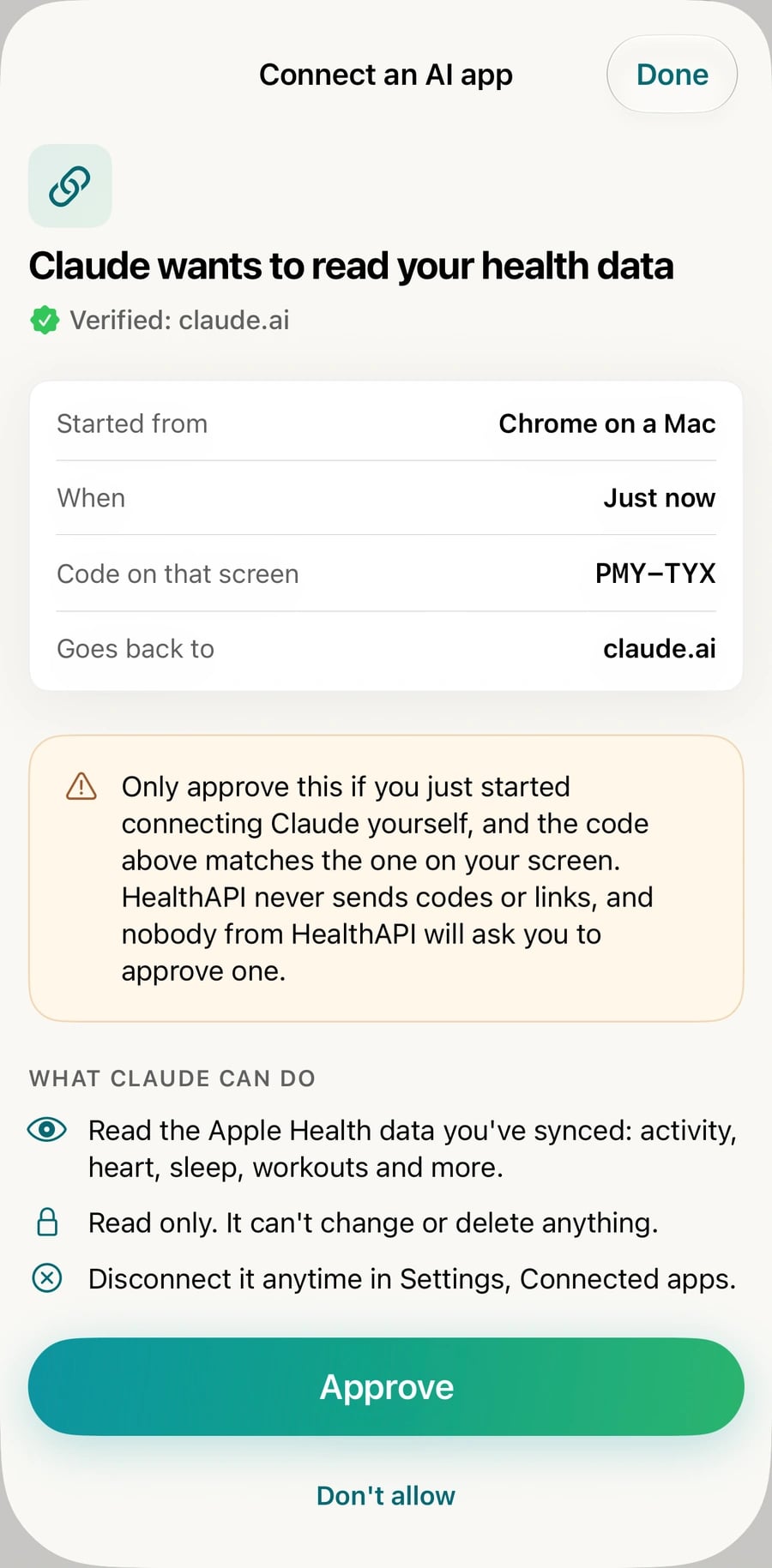
It signs in with OAuth. A HealthAPI page shows a short code, and you approve it in the app on your iPhone.Your AI app calls the tools
When you ask a question, it calls the tools it needs, such as a day's summary or a metric's trend, and answers from your data.
Why it doesn't need an export
Many Apple Health MCP servers work from the Health app's XML export: you export, copy the file to your computer and run the server there. That works on a desktop, but the data is only as fresh as your last export, and AI apps on the web and on your phone can't reach a server on your laptop.
| Export-based, run locally | HealthAPI | |
|---|---|---|
| Data | The last file you exported | Synced from your iPhone |
| Runs on | Your computer | Hosted at healthapi.app |
| Works in | Apps on that computer | Claude on the web, desktop and mobile, ChatGPT on the web, and code tools |
| Sign-in | None, it reads a local file | OAuth, approved on your iPhone |
If you want your data to stay entirely on your own computer, a local server is the right choice. If you want it current and available wherever you use AI, a hosted server is.
Connect your client
Every client uses the same address:
https://healthapi.app/mcp| Client | How |
|---|---|
| Claude | Customize, Connectors, + Add, Add custom connector. Every plan, including Free (one custom connector), on the web, desktop and mobile. Full guide. |
| ChatGPT | Plugins, +, add a custom MCP server with the address and OAuth, Create as a plugin, then install it and type @ in a chat. Plus, Pro, Business, Enterprise or Edu, on chatgpt.com in a browser; not Free or Go. Full guide. |
| Claude Code | claude mcp add --transport http healthapi https://healthapi.app/mcp, then /mcp to sign in. |
| Cursor, VS Code | An HTTP MCP server with url set to the address, in ~/.cursor/mcp.json or .vscode/mcp.json. |
| Other MCP clients | A remote server over Streamable HTTP. Clients that support MCP's OAuth sign-in find it on their own. |
Clients that send headers instead
A tool that can't run an OAuth sign-in can send your HealthAPI API key as a Bearer token instead. The key is in the app under Connect, then Other tools. For example, in Cursor:
{
  "mcpServers": {
    "healthapi": {
      "url": "https://healthapi.app/mcp",
      "headers": { "Authorization": "Bearer <your API key>" }
    }
  }
}
The key reads everything you've synced, so keep it out of shared files. Regenerating it in the app cuts off every tool that has it.
The 8 tools
Every tool is read only and annotated that way (readOnlyHint), so your AI app knows nothing can change. Dates are local to your timezone, and a night of sleep belongs to the morning it ended.
| Tool | Returns | Inputs |
|---|---|---|
get_health_overview | Every metric with its first and last day, sleep and workout history, last sync, timezone, requests left. Call it first. | None |
get_daily_summary | One day: activity, energy, heart, blood oxygen, respiratory rate, workouts and that morning's sleep. | date (defaults to today) |
get_weekly_summary | A Monday-to-Sunday week: totals, daily averages and a line per day. | week, e.g. 2026-W41 (defaults to this week) |
get_sleep | Per night: asleep (core, deep, REM), awake, in bed, bedtime and wake time, with averages. | start_date, end_date (a week by default, up to 92 nights) |
get_trend | One metric day by day, a total or an average with low and high, and the period's average. | metric, days (1 to 365, default 30) |
get_latest | The newest reading of each metric, with when it was taken. | metrics (defaults to all) |
get_workouts | Workouts between two days, newest first, with totals. | start_date, end_date, activity_type, limit (up to 100) |
get_samples | Individual readings of one metric, for a specific moment such as heart rate during a run. | metric, start_date, end_date (up to 31 days), limit (up to 500) |
Metric names are HealthKit names such as restingHeartRate or vo2Max. All 50 are listed here. The same data is available over the REST API.
Sign-in and discovery
A request without a token gets 401 with a WWW-Authenticate header pointing at the protected resource metadata, which is how clients start signing in. The addresses:
https://healthapi.app/mcp
https://healthapi.app/.well-known/oauth-protected-resource/mcp
https://healthapi.app/.well-known/oauth-authorization-server- OAuth 2.1 authorization code flow with PKCE (
S256). Clients identify with a Client ID Metadata Document or register dynamically (RFC 7591). - One scope,
health.read: read the account's synced health data. - No password. The sign-in page shows a 6-character code and a QR code; you approve it in the HealthAPI app. It waits 10 minutes.
- Tokens: access tokens last an hour; refresh tokens last 60 days and rotate on use, so a connection you use stays signed in.
Limits
Each tool call counts as one request toward your HealthAPI daily limit; the protocol's other messages don't. A question usually takes a few calls. The count resets at 00:00 UTC.
| Plan | Requests a day |
|---|---|
| Free preview (2 days, no card) | 25 |
| Pro | 100 |
| Developer | 1,000 |
When the day's requests are used up, the tool returns a message saying when they reset, which your AI app passes on. The plans differ only in requests per day.
Security and privacy
- You approve every connection on your iPhone, and see each one in HealthAPI under Settings, Connected apps, where you can disconnect it.
- Read only. No tool can change or delete anything, and HealthAPI never writes to Apple Health.
- Only when asked. Your AI app reads your data when you ask it something, never in the background.
- No credentials in URLs. The address is the same for everyone; who you are comes from the sign-in.
- One switch for everything. Regenerating your API key disconnects every connected app at once. See our privacy policy.
Questions
Do I need to export my Apple Health data first?
No. The HealthAPI app on your iPhone syncs Apple Health to your account and keeps it up to date, so the server always reads your latest synced data. There is no file to export, convert or point at.
Do I run anything on my computer?
No. The server is hosted at https://healthapi.app/mcp. You add the address to your AI app and approve the sign-in on your iPhone.
Which AI apps can use it?
Claude on every plan, including Free (one custom connector). ChatGPT on Plus, Pro, Business, Enterprise or Edu, set up on chatgpt.com. Claude Code, Cursor, VS Code and other MCP clients that support remote servers over HTTP.
Can it change or delete my health data?
No. All eight tools are read only, and they are marked read only to your AI app. HealthAPI never writes to Apple Health.
Does it cost extra?
No, it is part of every HealthAPI plan. Each tool call uses one of your daily requests: 100 a day on Pro, 1,000 on Developer, and 25 during the 2-day free preview.
How do I disconnect an AI app?
In HealthAPI, open Settings, then Connected apps, and choose Disconnect. Regenerating your API key disconnects every app at once.